
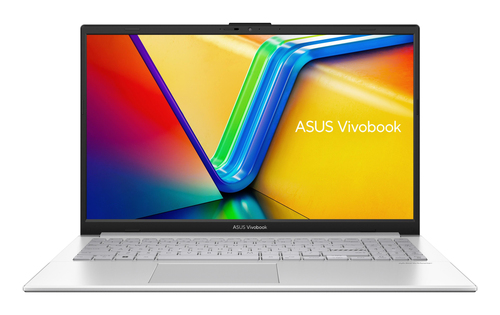
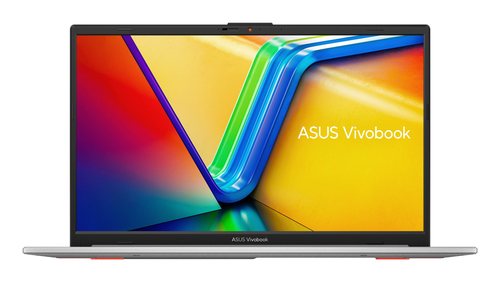
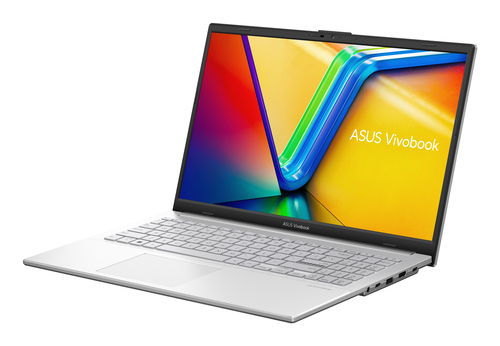
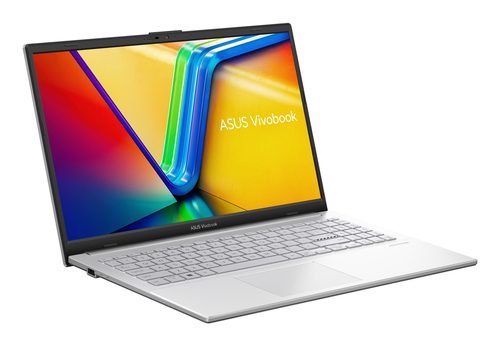
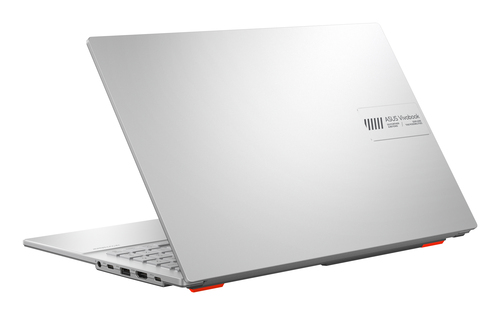
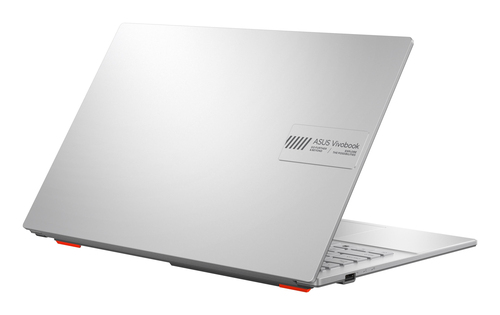
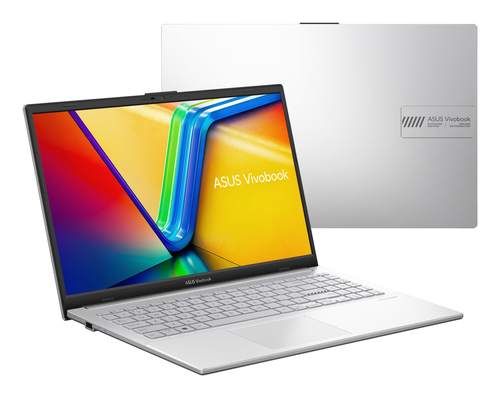
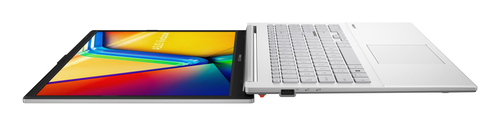
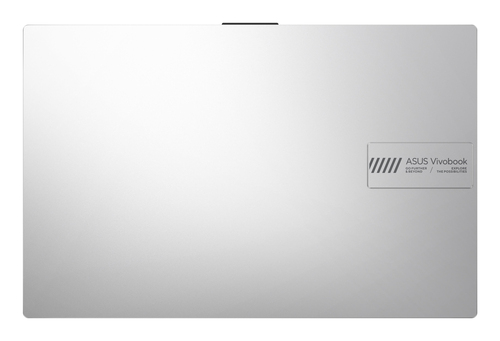
ASUS Vivobook Go 15 E1504FA-BQ5080W AMD Ryzen™ 5 7520U Laptop 39.6 cm (15.6") Full HD 8 GB LPDDR5-SDRAM 512 GB SSD Wi-Fi 6E (802.11ax) Windows 11 Home Silver QWERTY Spanish

Product code:
90NB0ZR1-M075Y0
Brand:
ASUS
Product family:
Vivobook Go
Product series:
15
Product name:
E1504FA-BQ5080W
GTIN (EAN/UPC):
4711636411691, 0199291411692, 199291411692

Bullet Points ASUS Vivobook Go 15 E1504FA-BQ5080W AMD Ryzen™ 5 7520U Laptop 39.6 cm (15.6") Full HD 8 GB LPDDR5-SDRAM 512 GB SSD Wi-Fi 6E (802.11ax) Windows 11 Home Silver QWERTY Spanish:
- Windows 11 Home 64-bit
- AMD Ryzen 5 40 (2.8GHz)
- 39.6 cm (15.6") Full HD 1920 x 1080 IPS-Level
- 8GB LPDDR5-SDRAM & 512GB SSD
Long product name ASUS Vivobook Go 15 E1504FA-BQ5080W AMD Ryzen™ 5 7520U Laptop 39.6 cm (15.6") Full HD 8 GB LPDDR5-SDRAM 512 GB SSD Wi-Fi 6E (802.11ax) Windows 11 Home Silver QWERTY Spanish:
AMD Ryzen 5 40 (2.8GHz), 8GB LPDDR5-SDRAM, 512GB SSD, 39.6 cm (15.6") Full HD 1920 x 1080 IPS-Level, AMD Radeon 610M, WLAN, Webcam, Windows 11 Home 64-bit
ASUS Vivobook Go 15 E1504FA-BQ5080W AMD Ryzen™ 5 7520U Laptop 39.6 cm (15.6") Full HD 8 GB LPDDR5-SDRAM 512 GB SSD Wi-Fi 6E (802.11ax) Windows 11 Home Silver QWERTY Spanish:
Be productive as you Go
It’s light. It’s compact. It’s the ASUS Vivobook Go 15 OLED, and it’s designed to make you productive and keep you entertained wherever you go! With its 180° lay-flat hinge, physical webcam shield and loads of thoughtful design features — including a gorgeous OLED display —Vivobook Go 15 OLED is the laptop that sets you free!
World-leading 15.6” OLED display
- 16:9 aspect ratio, 1920 by 1080 resolution,
- 84% screen-to-body ratio, 100% DCI-P3,
- 500 nits peak brightness
Display
Clearly superior display
Vivobook Go 15 OLED has stunningly crisp and clear visuals, with a reduced risk of eye strain during long viewing sessions thanks to its TÜV Rheinland eye-care certified OLED panel. The NanoEdge slim-bezel design gives you more screen space for multitasking and immersive viewing.
Performance
Missions accomplished!
Vivobook Go 15 OLED is powered by up to an AMD Ryzen™ 5 processor, 16 GB of speedy LDDR5 memory and 512 GB of storage to help you complete all your productivity missions.
Battery
Fast charging
Vivobook Go 15 OLED supports fast charging, so you can charge a low battery to 60% in as little as 49 minutes4. You’ll be up and running quicker than ever!
Audio
Outstanding audio to hear the world
Vivobook Go 15 OLED provides incredibly powerful, crystal-clear sound with ASUS SonicMaster and DTS Audio Processing. The combination of hardware and software boost the volume, and remove noise to improve audio clarity so you get truly immersive sound.
Design Highlight
Choose your color
Vivobook Go 15 OLED is available in three colors: the never-out-of-fashion Mixed Black and Cool Silver, and the brand-new cozy Grey Green. While matching your style, Vivobook Go 15 OLED is also slim enough to slip into your bag, and light enough for easy one-handed carrying.
180° Hinge
Wide open for sharing
Vivobook Go 15 OLED features a precision-engineered, 180° lay-flat hinge that makes it easy to share content or collaborate with others.
ErgoSense
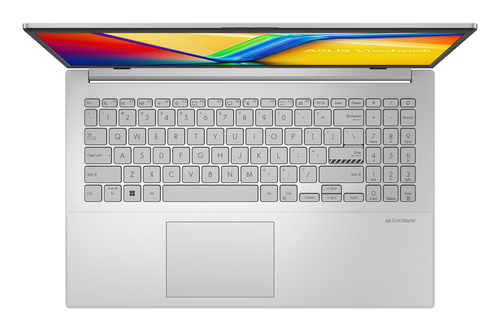
ASUS ErgoSense keyboard, comfortable typing experience
Your comfort is our highest priority. That’s why the ASUS ErgoSense keyboard has an incredibly satisfying feel, with the optimum key bounce and travel calculated with fine-tuned precision. Experience the ErgoSense keyboard and you’ll soon find yourself cruising effortlessly through your work.
Full-sized keyboard 19.05 mm
The full-size 19.05 mm key pitch is the same as a desktop keyboard so you can whizz through your work with superb typing comfort and accuracy.
Dished key caps 0.2 mm
The 0.2 mm key-cap dish is designed to match the shape of your fingertips so your fingers are gently guided to the ideal contact point with the keys.
Long key travel 1.4 mm
Good tactile feedback is important to let you know that your key press has been registered. The long 1.4 mm key travel lets you type without having to use too much force. And underneath the key, there’s a rubber dome crafted by keyboard experts here at ASUS. It guarantees your click force is met with just the right tactile bump you need for a nice grip.
0.1 mm key cap relief
When fully depressed, the keys on the ErgoSense keyboard don’t sink below the level of the keyboard deck. The key caps remain at least 0.1 mm above the chassis surface, providing you with a comfortable, ergonomic typing experience.
Enhanced number key layout
Blitz through data-crunching tasks with the enhanced number key layout! This features hotkeys for the calculator, CE and +/- functions, along with increased spacing to match the full-size key pitch for more intuitive number entry.
Optimal click ratio: Engineered to perfection
The feel of a keyboard depends on the crucial ratio between the peak force (also known as the actuation force) and the contact force. Peak force occurs when you press down on the key and reach the maximum force that the key’s underlying rubber dome can withstand without deflecting. Contact force occurs when the bottom of the key touches the circuit board to trigger an electronic signal, which in turn generates the action appropriate to the key. To achieve the most natural feel for a keyboard, ASUS keyboard experts have scientifically determined that the optimal ergonomic click ratio for a key is between 45-60%. These forces are precisely measured and tuned using the ASUS-designed rubber domes beneath the keys.
User Experience
User friendly design
Unlock with one touch
Accessing your device has never been easier or more secure! With the built-in fingerprint sensor5 in the touchpad and Windows Hello, there’s no need to type in your password every time — all you need is a single touch!
Physical webcam privacy shield
Vivobook Go 15 OLED takes your privacy and security seriously. There’s an integrated privacy shield that slides over the webcam for instant privacy, shielding you from prying eyes and disturbances.
Connectivity
Perfect in every detail
Vivobook Go 15 OLED keeps you fully connected with its comprehensive I/O ports. There are a USB-C® 3.2 Gen 1 port, a USB 3.2 Gen 1 Type-A ports, a USB 2.0 port, HDMI® output and an audio combo jack — so it’s easy to connect all your existing peripherals, displays and projectors.
WiFi
Fine-tuned with ASUS WiFi Master technology
Vivobook Go 15 OLED offers a comprehensive range of wireless connectivity. WiFi 6E6 (802.11ax) allows you to load online content in the blink of an eye.
Military-grade
World’s most strictly tested US military-grade laptop durability
ASUS laptops7 are engineered with extraordinary toughness meet the exacting US MIL-STD-810H military-grade standard, undergoing 12 rigorous test methods and 26 punishing test procedures — exceeding industry standards. The upshot is a range of products that are renowned for reliability and durability. These factors also inherently benefit longevity and thus sustainability, so you can work, travel or relax with the confidence that your ASUS laptop is ready for the real world — today, and long into the future.
AI Noise Cancelation
Next-level AI noise-canceling audio technology
To provide exceptional remote-working and video-conferencing experiences, features ASUS AI Noise-Canceling Technology that employs machine learning in order to isolate unwanted noise from human speech. This technology helps to filter out ambient noise for optimum group conference-call quality. The ASUS AI Noise-Canceling Microphone feature in the MyASUS app can filter out ambient noise
— so you’ll hear what everyone else is saying.
Try the demo to experience the amazing difference that AI Noise-Canceling Technology can make in different environments.
Press play to experience ASUS AI Noise-Canceling Technology
Turn on your device audio to hear the difference.
Conference Call
Conference calls with more possibilities
Conference calls can be single-presenter or multi-presenter, gathered around a single laptop with voices coming from various directions. With the upgraded system enabled via the MyASUS app, it detects and optimizes audio from either one direction or from all directions — ensuring top conference call audio quality.
Single presenter conference call
Single-presenter conference call mode can filter out noise and other voices, and ensures only the voice in front of laptop can be heard. When you switch on the Target Speaker Tracking mode it can even target and track new talkers within a 180° arc, making the feature ideal for recording large groups as well as for individuals.
Multi-presenter conference call
Multi-presenter conference call mode filters out ambient noise whilst identifying multiple voices from all directions and distances, so all voices can be heard more clearly.
3DNR
Standout webcam effect – ASUS 3DNR
ASUS 3D Noise Reduction (3DNR) Technology significantly upgrades the webcam image clarity for clearer conference calls.
Software
Truly personalized workflow
MyASUS hosts a collection of handy ASUS apps and tools that help you get more out of your laptop. GlideX is a powerful cross-device screen-sharing solution. ScreenXpert helps you to manage app windows across displays connected to your ASUS PC, giving you full control of your workflow!
MyASUS
MyASUS
MyASUS provides easy access to ASUS apps that are designed to help you maintain your system, update your software, optimize your PC’s performance, and contact ASUS for after-sales support.
GlideX
GlideX
GlideX is a cross-device screen-sharing solution that uses wired or wireless connections to give you a bigger and better space for work and play. GlideX optimizes your workflow in the blink of an eye!
ScreenXpert
ScreenXpert for ASUS PCs
ScreenXpert for ASUS PCs — which you can download from Microsoft Store or find in your PC’s Start menu — helps you to manage app windows across displays connected to your ASUS PC and puts you in full control of your workflow!
It’s light. It’s compact. It’s the ASUS Vivobook Go 15 OLED, and it’s designed to make you productive and keep you entertained wherever you go! With its 180° lay-flat hinge, physical webcam shield and loads of thoughtful design features — including a gorgeous OLED display —Vivobook Go 15 OLED is the laptop that sets you free!
World-leading 15.6” OLED display
- 16:9 aspect ratio, 1920 by 1080 resolution,
- 84% screen-to-body ratio, 100% DCI-P3,
- 500 nits peak brightness
Display
Clearly superior display
Vivobook Go 15 OLED has stunningly crisp and clear visuals, with a reduced risk of eye strain during long viewing sessions thanks to its TÜV Rheinland eye-care certified OLED panel. The NanoEdge slim-bezel design gives you more screen space for multitasking and immersive viewing.
Performance
Missions accomplished!
Vivobook Go 15 OLED is powered by up to an AMD Ryzen™ 5 processor, 16 GB of speedy LDDR5 memory and 512 GB of storage to help you complete all your productivity missions.
Battery
Fast charging
Vivobook Go 15 OLED supports fast charging, so you can charge a low battery to 60% in as little as 49 minutes4. You’ll be up and running quicker than ever!
Audio
Outstanding audio to hear the world
Vivobook Go 15 OLED provides incredibly powerful, crystal-clear sound with ASUS SonicMaster and DTS Audio Processing. The combination of hardware and software boost the volume, and remove noise to improve audio clarity so you get truly immersive sound.
Design Highlight
Choose your color
Vivobook Go 15 OLED is available in three colors: the never-out-of-fashion Mixed Black and Cool Silver, and the brand-new cozy Grey Green. While matching your style, Vivobook Go 15 OLED is also slim enough to slip into your bag, and light enough for easy one-handed carrying.
180° Hinge
Wide open for sharing
Vivobook Go 15 OLED features a precision-engineered, 180° lay-flat hinge that makes it easy to share content or collaborate with others.
ErgoSense
ASUS ErgoSense keyboard, comfortable typing experience
Your comfort is our highest priority. That’s why the ASUS ErgoSense keyboard has an incredibly satisfying feel, with the optimum key bounce and travel calculated with fine-tuned precision. Experience the ErgoSense keyboard and you’ll soon find yourself cruising effortlessly through your work.
Full-sized keyboard 19.05 mm
The full-size 19.05 mm key pitch is the same as a desktop keyboard so you can whizz through your work with superb typing comfort and accuracy.
Dished key caps 0.2 mm
The 0.2 mm key-cap dish is designed to match the shape of your fingertips so your fingers are gently guided to the ideal contact point with the keys.
Long key travel 1.4 mm
Good tactile feedback is important to let you know that your key press has been registered. The long 1.4 mm key travel lets you type without having to use too much force. And underneath the key, there’s a rubber dome crafted by keyboard experts here at ASUS. It guarantees your click force is met with just the right tactile bump you need for a nice grip.
0.1 mm key cap relief
When fully depressed, the keys on the ErgoSense keyboard don’t sink below the level of the keyboard deck. The key caps remain at least 0.1 mm above the chassis surface, providing you with a comfortable, ergonomic typing experience.
Enhanced number key layout
Blitz through data-crunching tasks with the enhanced number key layout! This features hotkeys for the calculator, CE and +/- functions, along with increased spacing to match the full-size key pitch for more intuitive number entry.
Optimal click ratio: Engineered to perfection
The feel of a keyboard depends on the crucial ratio between the peak force (also known as the actuation force) and the contact force. Peak force occurs when you press down on the key and reach the maximum force that the key’s underlying rubber dome can withstand without deflecting. Contact force occurs when the bottom of the key touches the circuit board to trigger an electronic signal, which in turn generates the action appropriate to the key. To achieve the most natural feel for a keyboard, ASUS keyboard experts have scientifically determined that the optimal ergonomic click ratio for a key is between 45-60%. These forces are precisely measured and tuned using the ASUS-designed rubber domes beneath the keys.
User Experience
User friendly design
Unlock with one touch
Accessing your device has never been easier or more secure! With the built-in fingerprint sensor5 in the touchpad and Windows Hello, there’s no need to type in your password every time — all you need is a single touch!
Physical webcam privacy shield
Vivobook Go 15 OLED takes your privacy and security seriously. There’s an integrated privacy shield that slides over the webcam for instant privacy, shielding you from prying eyes and disturbances.
Connectivity
Perfect in every detail
Vivobook Go 15 OLED keeps you fully connected with its comprehensive I/O ports. There are a USB-C® 3.2 Gen 1 port, a USB 3.2 Gen 1 Type-A ports, a USB 2.0 port, HDMI® output and an audio combo jack — so it’s easy to connect all your existing peripherals, displays and projectors.
WiFi
Fine-tuned with ASUS WiFi Master technology
Vivobook Go 15 OLED offers a comprehensive range of wireless connectivity. WiFi 6E6 (802.11ax) allows you to load online content in the blink of an eye.
Military-grade
World’s most strictly tested US military-grade laptop durability
ASUS laptops7 are engineered with extraordinary toughness meet the exacting US MIL-STD-810H military-grade standard, undergoing 12 rigorous test methods and 26 punishing test procedures — exceeding industry standards. The upshot is a range of products that are renowned for reliability and durability. These factors also inherently benefit longevity and thus sustainability, so you can work, travel or relax with the confidence that your ASUS laptop is ready for the real world — today, and long into the future.
AI Noise Cancelation
Next-level AI noise-canceling audio technology
To provide exceptional remote-working and video-conferencing experiences, features ASUS AI Noise-Canceling Technology that employs machine learning in order to isolate unwanted noise from human speech. This technology helps to filter out ambient noise for optimum group conference-call quality. The ASUS AI Noise-Canceling Microphone feature in the MyASUS app can filter out ambient noise
— so you’ll hear what everyone else is saying.
Try the demo to experience the amazing difference that AI Noise-Canceling Technology can make in different environments.
Press play to experience ASUS AI Noise-Canceling Technology
Turn on your device audio to hear the difference.
Conference Call
Conference calls with more possibilities
Conference calls can be single-presenter or multi-presenter, gathered around a single laptop with voices coming from various directions. With the upgraded system enabled via the MyASUS app, it detects and optimizes audio from either one direction or from all directions — ensuring top conference call audio quality.
Single presenter conference call
Single-presenter conference call mode can filter out noise and other voices, and ensures only the voice in front of laptop can be heard. When you switch on the Target Speaker Tracking mode it can even target and track new talkers within a 180° arc, making the feature ideal for recording large groups as well as for individuals.
Multi-presenter conference call
Multi-presenter conference call mode filters out ambient noise whilst identifying multiple voices from all directions and distances, so all voices can be heard more clearly.
3DNR
Standout webcam effect – ASUS 3DNR
ASUS 3D Noise Reduction (3DNR) Technology significantly upgrades the webcam image clarity for clearer conference calls.
Software
Truly personalized workflow
MyASUS hosts a collection of handy ASUS apps and tools that help you get more out of your laptop. GlideX is a powerful cross-device screen-sharing solution. ScreenXpert helps you to manage app windows across displays connected to your ASUS PC, giving you full control of your workflow!
MyASUS
MyASUS
MyASUS provides easy access to ASUS apps that are designed to help you maintain your system, update your software, optimize your PC’s performance, and contact ASUS for after-sales support.
GlideX
GlideX
GlideX is a cross-device screen-sharing solution that uses wired or wireless connections to give you a bigger and better space for work and play. GlideX optimizes your workflow in the blink of an eye!
ScreenXpert
ScreenXpert for ASUS PCs
ScreenXpert for ASUS PCs — which you can download from Microsoft Store or find in your PC’s Start menu — helps you to manage app windows across displays connected to your ASUS PC and puts you in full control of your workflow!
Disclaimer ASUS Vivobook Go 15 E1504FA-BQ5080W AMD Ryzen™ 5 7520U Laptop 39.6 cm (15.6") Full HD 8 GB LPDDR5-SDRAM 512 GB SSD Wi-Fi 6E (802.11ax) Windows 11 Home Silver QWERTY Spanish $90NB0ZR1-M075Y0:
The devices referred to on this web page are the most highly-specified models available. Some models and configurations may not have an OLED display option. Please check the product specifications to ensure that the correct type of display is configured before purchasing in-store or online.
The visual appearance of OLED displays may change over the product’s lifetime. This is expected behavior that can include image persistence or burn-in, where the display shows a faint remnant of an image even after a new image appears on the screen. This tends to occur only in extreme use cases, such as when a static, high-contrast image is continuously displayed for prolonged periods of time. ASUS laptops with an OLED display minimize this risk by setting Windows’s Dark mode as default, as well as shortening the idle time before the screen is turned off — both on mains (AC) and battery (DC) power. This dual approach minimizes the potential for burn-in to maximize the lifespan of your OLED display lifespan, and also reduces unnecessary power draw for optimal battery life. We also recommended adjust the brightness of your OLED display to complement the ambient lighting in your environment, rather than keeping the screen at maximum brightness at all times. You should also ensure that you have an animated, dark-background screensaver enabled in the Windows Settings tool. It is recommended that during heavy usage, the laptop lid is opened by more than 90°, in order to minimize any effects on OLED screen quality and longevity.
Maximum RAM capacity may vary according to device configuration.
Maximum SSD capacity may vary according to device configuration.
Charges the battery to up to 60% within 49 minutes when the system is off or in Standby mode. Power adapter with a minimum capacity of 45 watts is required. After charging has reached 60% capacity, charging will resume at normal rate. Charging time may vary +/-10% due to system tolerance.
Backlit keyboard and integrated fingerprint sensor are optional.
WiFi 6E is backwards-compatible with legacy 802.11 specs. Actual performance of WiFi 6E may vary in real-world situations.
The testing regime includes the requirements of both military-grade standards and ASUS quality tests, and varies depending on device. MIL-STD-810 testing is conducted on selected ASUS products only. Note that the MIL-STD-810 testing helps to ensure the quality of ASUS products but does not indicate a particular fitness for military use. The test is performed under laboratory conditions. Any damage caused by attempts to replicate these test conditions would be considered accidental, and would not be covered by the standard ASUS warranty. Additional coverage is available with ASUS Premium Care.
The screen-to-body ratio is calculated based on the visible body area of the display when the laptop is opened to 90° and the active display area.
Average test results: Delta-E < 1.5, +/- 0.5. Over time, the Delta-E value of the display may change. It is recommended to recalibrate the color to ensure color accuracy.
Compared to average LCD displays in the market, measuring energy emission of blue light in between 415-455 nm wavelength.
Compared to average LCD laptop panel. Average LCD display has 10 ms response time.
This amendment defines standardized modifications to both the IEEE 802.11 physical layers (PHY) and the IEEE 802.11 Medium Access Control layer (MAC) that enable at least one mode of operation capable of supporting at least four times improvement in the average throughput per station (measured at the MAC data service access point) in a dense deployment scenario, while maintaining or improving the power efficiency per station. For additional details visit: https://mentor.ieee.org/802.11/dcn/14/11-14-0165-01-0hew-802-11-hew-sg-proposed-par.docx
802.11ax 2x2 160 MHz enables 2402 Mbps maximum theoretical data rate, ~3x faster than standard 802.11ac 2x2 80 MHz (867 Mbps) and nearly 6x faster than baseline 1x1ac (433 Mbps) Wi-Fi as documented in IEEE 802.11 wireless standard specifications, and require the use of similarly configured 802.11ax wireless network routers.
“Up to 75% lower latency” is based on Intel simulation data of 802.11ax with and without OFDMA using 9 clients. Average latency without OFDM is 36 ms, with OFDMA average latency is reduced to 7.6 ms. Latency improvement requires that the AP and all clients support OFDMA.
Selected products are tested using enhanced military-grade MIL-STD-810H durability standards, with 12 test methods and 26 test procedures, to ensure extraordinary toughness. Based on ASUS internal market research using available information and testing reports from main laptop brand websites on Oct 28, 2022, ASUS consumer laptops use a regime consisting of 26 test procedures, which is the consumer laptop industry’s strictest and most extensive test regime for the MIL-STD-810H standard.
Products certified by the Federal Communications Commission and Industry Canada will be distributed in the United States and Canada. Please visit the ASUS USA and ASUS Canada websites for information about locally available products.
All specifications are subject to change without notice. Please check with your supplier for exact offers. Products may not be available in all markets.
Specifications and features vary by model, and all images are illustrative. Please refer to specification pages for full details.
PCB color and bundled software versions are subject to change without notice.
Brand and product names mentioned are trademarks of their respective companies.
The terms HDMI and HDMI High-Definition Multimedia Interface, HDMI trade dress and the HDMI Logos are trademarks or registered trademarks of HDMI Licensing Administrator, Inc. in the United States and other countries.
*¹The Windows 11 upgrade will be delivered to qualifying devices late 2021 into 2022. Timing will vary by device. Certain features require specific hardware (see aka.ms/windows11-spec). ¹The Windows 11 upgrade will be delivered to qualifying devices late 2021 into 2022. Timing will vary by device. Certain features require specific hardware (see aka.ms/windows11-spec).*
IPS stands for in-plane switching, a type of LED (a form of LCD) display panel technology.
Unless otherwise stated, all performance claims are based on theoretical performance. Actual figures may vary in real-world situations.
The actual transfer speed of USB 3.0, 3.1, 3.2, and/or Type-C will vary depending on many factors including the processing speed of the host device, file attributes and other factors related to system configuration and your operating environment.
Ultrabook, Celeron, Celeron Inside, Core Inside, Intel, Intel Logo, Intel Atom, Intel Atom Inside, Intel Core, Intel Inside, Intel Inside Logo, Intel vPro, Itanium, Itanium Inside, Pentium, Pentium Inside, vPro Inside, Xeon, Xeon Phi, and Xeon Inside are trademarks of Intel Corporation or its subsidiaries in the U.S. and/or other countries.
Product specifications may differ from country to country. We recommend that you check with your local dealers for the specifications of the products available in your country. Colors of products may not be perfectly accurate due to variations caused by photography and monitor settings.Due to photographic variables and conditions, actual product appearance may differ from images shown on this site.Although we endeavor to present the most accurate and comprehensive information at the time of publication, we reserve the right to make changes without prior notice.
Price may not include extra fee, including tax、shipping、handling、recycling fee.
For pricing information, ASUS is only entitled to set a recommendation resale price. All resellers are free to set their own price as they wish.
* Result from Mobile Mark 2014 office productivity.
The visual appearance of OLED displays may change over the product’s lifetime. This is expected behavior that can include image persistence or burn-in, where the display shows a faint remnant of an image even after a new image appears on the screen. This tends to occur only in extreme use cases, such as when a static, high-contrast image is continuously displayed for prolonged periods of time. ASUS laptops with an OLED display minimize this risk by setting Windows’s Dark mode as default, as well as shortening the idle time before the screen is turned off — both on mains (AC) and battery (DC) power. This dual approach minimizes the potential for burn-in to maximize the lifespan of your OLED display lifespan, and also reduces unnecessary power draw for optimal battery life. We also recommended adjust the brightness of your OLED display to complement the ambient lighting in your environment, rather than keeping the screen at maximum brightness at all times. You should also ensure that you have an animated, dark-background screensaver enabled in the Windows Settings tool. It is recommended that during heavy usage, the laptop lid is opened by more than 90°, in order to minimize any effects on OLED screen quality and longevity.
Maximum RAM capacity may vary according to device configuration.
Maximum SSD capacity may vary according to device configuration.
Charges the battery to up to 60% within 49 minutes when the system is off or in Standby mode. Power adapter with a minimum capacity of 45 watts is required. After charging has reached 60% capacity, charging will resume at normal rate. Charging time may vary +/-10% due to system tolerance.
Backlit keyboard and integrated fingerprint sensor are optional.
WiFi 6E is backwards-compatible with legacy 802.11 specs. Actual performance of WiFi 6E may vary in real-world situations.
The testing regime includes the requirements of both military-grade standards and ASUS quality tests, and varies depending on device. MIL-STD-810 testing is conducted on selected ASUS products only. Note that the MIL-STD-810 testing helps to ensure the quality of ASUS products but does not indicate a particular fitness for military use. The test is performed under laboratory conditions. Any damage caused by attempts to replicate these test conditions would be considered accidental, and would not be covered by the standard ASUS warranty. Additional coverage is available with ASUS Premium Care.
The screen-to-body ratio is calculated based on the visible body area of the display when the laptop is opened to 90° and the active display area.
Average test results: Delta-E < 1.5, +/- 0.5. Over time, the Delta-E value of the display may change. It is recommended to recalibrate the color to ensure color accuracy.
Compared to average LCD displays in the market, measuring energy emission of blue light in between 415-455 nm wavelength.
Compared to average LCD laptop panel. Average LCD display has 10 ms response time.
This amendment defines standardized modifications to both the IEEE 802.11 physical layers (PHY) and the IEEE 802.11 Medium Access Control layer (MAC) that enable at least one mode of operation capable of supporting at least four times improvement in the average throughput per station (measured at the MAC data service access point) in a dense deployment scenario, while maintaining or improving the power efficiency per station. For additional details visit: https://mentor.ieee.org/802.11/dcn/14/11-14-0165-01-0hew-802-11-hew-sg-proposed-par.docx
802.11ax 2x2 160 MHz enables 2402 Mbps maximum theoretical data rate, ~3x faster than standard 802.11ac 2x2 80 MHz (867 Mbps) and nearly 6x faster than baseline 1x1ac (433 Mbps) Wi-Fi as documented in IEEE 802.11 wireless standard specifications, and require the use of similarly configured 802.11ax wireless network routers.
“Up to 75% lower latency” is based on Intel simulation data of 802.11ax with and without OFDMA using 9 clients. Average latency without OFDM is 36 ms, with OFDMA average latency is reduced to 7.6 ms. Latency improvement requires that the AP and all clients support OFDMA.
Selected products are tested using enhanced military-grade MIL-STD-810H durability standards, with 12 test methods and 26 test procedures, to ensure extraordinary toughness. Based on ASUS internal market research using available information and testing reports from main laptop brand websites on Oct 28, 2022, ASUS consumer laptops use a regime consisting of 26 test procedures, which is the consumer laptop industry’s strictest and most extensive test regime for the MIL-STD-810H standard.
Products certified by the Federal Communications Commission and Industry Canada will be distributed in the United States and Canada. Please visit the ASUS USA and ASUS Canada websites for information about locally available products.
All specifications are subject to change without notice. Please check with your supplier for exact offers. Products may not be available in all markets.
Specifications and features vary by model, and all images are illustrative. Please refer to specification pages for full details.
PCB color and bundled software versions are subject to change without notice.
Brand and product names mentioned are trademarks of their respective companies.
The terms HDMI and HDMI High-Definition Multimedia Interface, HDMI trade dress and the HDMI Logos are trademarks or registered trademarks of HDMI Licensing Administrator, Inc. in the United States and other countries.
*¹The Windows 11 upgrade will be delivered to qualifying devices late 2021 into 2022. Timing will vary by device. Certain features require specific hardware (see aka.ms/windows11-spec). ¹The Windows 11 upgrade will be delivered to qualifying devices late 2021 into 2022. Timing will vary by device. Certain features require specific hardware (see aka.ms/windows11-spec).*
IPS stands for in-plane switching, a type of LED (a form of LCD) display panel technology.
Unless otherwise stated, all performance claims are based on theoretical performance. Actual figures may vary in real-world situations.
The actual transfer speed of USB 3.0, 3.1, 3.2, and/or Type-C will vary depending on many factors including the processing speed of the host device, file attributes and other factors related to system configuration and your operating environment.
Ultrabook, Celeron, Celeron Inside, Core Inside, Intel, Intel Logo, Intel Atom, Intel Atom Inside, Intel Core, Intel Inside, Intel Inside Logo, Intel vPro, Itanium, Itanium Inside, Pentium, Pentium Inside, vPro Inside, Xeon, Xeon Phi, and Xeon Inside are trademarks of Intel Corporation or its subsidiaries in the U.S. and/or other countries.
Product specifications may differ from country to country. We recommend that you check with your local dealers for the specifications of the products available in your country. Colors of products may not be perfectly accurate due to variations caused by photography and monitor settings.Due to photographic variables and conditions, actual product appearance may differ from images shown on this site.Although we endeavor to present the most accurate and comprehensive information at the time of publication, we reserve the right to make changes without prior notice.
Price may not include extra fee, including tax、shipping、handling、recycling fee.
For pricing information, ASUS is only entitled to set a recommendation resale price. All resellers are free to set their own price as they wish.
* Result from Mobile Mark 2014 office productivity.